-
Why Linux Operating System is Important for a DevOps Engineer?

Linux is extremely important for a DevOps Engineer due to its widespread use in cloud environments, automation, containerization, and server management. Here’s a breakdown of why Linux is critical in DevOps:
Linux is an open-source operating system based on Unix.It acts as a bridge between computer hardware and software, managing system resources and enabling users to run applications.
Foundation of Most Servers and Cloud Platforms
- Linux powers over 90% of cloud servers (AWS, GCP, Azure).
- Most web applications run on Linux-based virtual machines or containers.
- Example: When you launch an EC2 instance on AWS, the most common choice is a Linux-based AMI (Amazon Machine Image).
Open Source and Highly Customizable
- DevOps requires flexibility — Linux gives full control over system configurations.
- You can modify everything from the kernel to scripts to suit CI/CD pipelines or custom deployment needs.
Command Line Proficiency (Bash/Shell)
- Scripting is essential in DevOps (for automation, deployment, monitoring, etc.).
- Linux’s powerful shell environment (bash, sh, etc.) enables you to automate tasks easily.
- Example tasks: start/stop services, create users, move files, automate cron jobs.
Containerization & Orchestration
- Tools like Docker and Kubernetes are built around Linux features (namespaces, cgroups).
- Understanding Linux file systems, processes, and networking is vital to managing containers effectively.
Configuration Management
- Tools like Ansible, Puppet, and Chef are primarily used to manage Linux systems.
- Writing playbooks, manifests, and recipes requires a good understanding of Linux file structures, permissions, and services.
Security and Permissions
- DevOps engineers must manage user access, SSH keys, firewalls (iptables, ufw), and SELinux/AppArmor.
- Linux provides granular permission models and security controls.
Monitoring and Logging
- Tools like Prometheus, Grafana, ELK stack (Elasticsearch, Logstash, Kibana) rely on Linux for log collection and service metrics.
- Knowing log file locations (e.g.,
/var/log) and system services is essential.
Testing & CI/CD Pipelines
- Most CI/CD pipelines (e.g., Jenkins, GitHub Actions, GitLab CI) are built to run on Linux agents.
- Knowledge of Linux ensures you can troubleshoot and optimize pipeline executions.
Cloud & Infrastructure as Code
- Terraform, AWS CLI, and Kubernetes CLI (
kubectl) are often used in Linux shells. - Infrastructure provisioning and management is easier when you’re comfortable navigating a Linux system.
Key Features of Linux:
- Open-source: Anyone can view, modify, and distribute the source code.
- Free: Most Linux distributions are available at no cost.
- Secure: Strong user permissions and a large community help maintain high security.
- Stable and Reliable: Known for its stability, even under heavy loads or over long periods.
- Multitasking and Multiuser: Supports multiple users and tasks simultaneously.
- Highly customizable
- Lightweight and efficient
Linux Architecure and Components:
- Kernel –The Linux kernel is the core component of the Linux operating system. It acts as a bridge between the hardware and software of a computer.
Main Responsibilities of the Kernel:
- Process Management
Handles process creation, scheduling, and termination. - Memory Management
Manages RAM and virtual memory. - File System Management
Provides access to files and directories, regardless of the underlying hardware. - Device Drivers
Communicates with hardware (keyboards, disks, network cards, etc.). - Networking
Supports communication over various protocols like TCP/IP. - Security & Permissions
Controls user access to system resources.
- Shell – A shell is a program that takes commands from the user and passes them to the operating system (kernel) to execute. It then displays the output to the user.
Linux supports many types of shells. Common ones include:
Shell Description Bash Most widely used; default on many Linux distros. Zsh Like Bash but with more features and customization. Sh The original Unix shell (Bourne Shell). Fish User-friendly, modern shell. Tcsh / Csh Based on the C programming language syntax. - File System – Organizes and manages files and directories.
4. Utilities – Tools and applications that perform various tasks.
Popular Linux Distributions (Distros):
- Ubuntu
- Debian
- Fedora
- CentOS
- Arch Linux
- Red Hat Enterprise Linux (RHEL)
Why Linux Grew
- Open-source model encouraged innovation and contributions.
- Supported by the Free Software Foundation (FSF) and the GNU Project.
- Corporate backing by IBM, Red Hat, Google, and others.
- Ideal for servers, developers, and enterprise systems.
-
How to Change Directory Permissions in Linux — DevOps Guide

To change directory permissions in Linux, use the following:
chmod +rwx filename to add permissions
chmod -rwx directoryname to remove permissions.
chmod +x filename to allow executable permissions.
chmod -wx filename to take out write and executable permissions.
Note that “r” is for read, “w” is for write, and “x” is for execute.
Permission numbers are:
0 = —
1 = –x
2 = -w-
3 = -wx
4 = r-
5 = r-x
6 = rw-
7 = rwx
For example:
chmod 777 foldername will give read, write, and execute permissions for everyone.
chmod 700 foldername will give read, write, and execute permissions for the user only.
Another helpful command is changing ownerships of files and directories in Linux:
chown name filename
chown name foldername
These commands will give ownership to someone, but all sub files and directories still belong to the original owner. -
Linux Directory Structure Explained — Must-Know for Every DevOps Engineer!
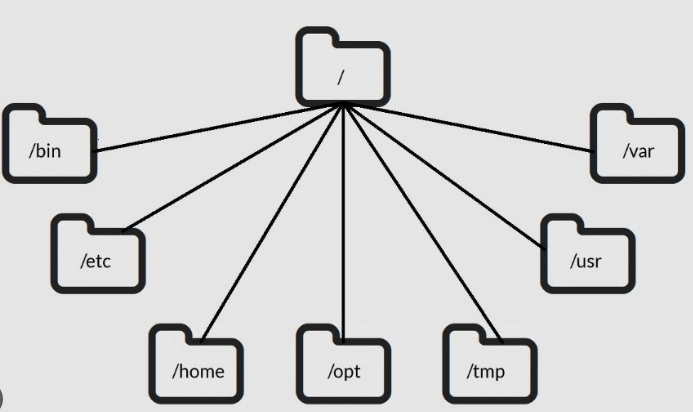
In Linux, everything starts from the root —
/. The entire file system is organized in a tree-like hierarchy, and understanding this structure is essential for DevOps engineers managing servers, containers, and cloud systems.Directory Purpose DevOps Relevance /Root – The base of the file system Starting point of all paths /binEssential binaries (e.g., ls,cp,mkdir)Must-have tools for shell scripting and automation /etcConfiguration files for the system and services Where you’ll edit config files like nginx.conf,sshd_config,crontab/homeUser home directories (e.g., /home/banesingh)Where DevOps users store scripts, SSH keys, etc. /optOptional or third-party software Useful for custom tools or proprietary installations /tmpTemporary files, often cleared on reboot Used for temp script output or application cache /usrSecondary hierarchy for user-installed apps and libraries Houses tools like /usr/bin/docker,/usr/lib/varVariable data, including logs ( /var/log), caches, spoolsImportant for monitoring, debugging, and CI/CD logs Visual Tree (Simplified)
/
├── bin/
├── etc/
├── home/
│ └── banesingh/
├── opt/
├── tmp/
├── usr/
│ ├── bin/
│ └── lib/
├── var/
│ └── log/Why It Matters in DevOps
- Automation: Knowing where config files and binaries live is key to scripting and Ansible roles.
- Troubleshooting: Logs in
/var/log, temp files in/tmp, and service configs in/etchelp debug systems fast. - Containers: Docker images and Kubernetes containers often use minimal Linux file systems — knowing the structure helps in custom Dockerfiles.
-
What is a Network Port? Why is it Important for a DevOps Engineer?
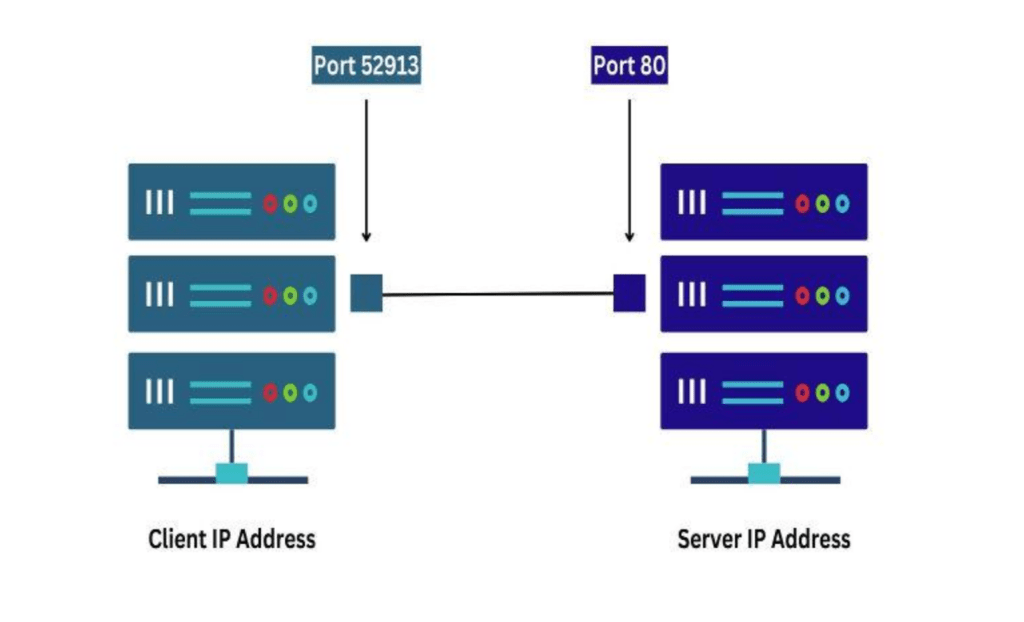
A port is a virtual point where network connections start and end. Ports are software-based and managed by a computer’s operating system.
Each port is associated with a specific process or service.
Ports allow computers to easily differentiate between different kinds of traffic: emails go to a different port than webpages, for instance, even though both reach a computer over the same Internet connection.
The numbers go from 0 to 65535, which is a 16-bit number.
Some of these port numbers are specifically defined and always associated with a specific type of service.
For example, File Transfer Protocol (FTP) is always port number 21 and Hypertext Transfer Protocol web traffic is always port 80. These are called well-known ports and go from 0 to 1023.
The numbers from 1024 to 49151 are called registered ports and can be registered with the Internet Assigned Numbers Authority(IANA) for a specific use. The numbers 49152 to 65535 are unassigned, can be used by any type of service and are called dynamic ports, private ports or ephemeral ports.
What are the different port numbers?
20 File Transfer Protocol (FTP) Data Transfer
21 File Transfer Protocol (FTP) Command Control
22 Secure Shell (SSH)
23 Telnet – Remote login service, unencrypted text messages
25 Simple Mail Transfer Protocol (SMTP) E-mail Routing
53 Domain Name System (DNS) service
80 Hypertext Transfer Protocol (HTTP) used in World Wide Web
110 Post Office Protocol (POP3) used by e-mail clients to retrieve e-mail from a server
119 Network News Transfer Protocol (NNTP)
123 Network Time Protocol (NTP)
143 Internet Message Access Protocol (IMAP) Management of Digital Mail
161 Simple Network Management Protocol (SNMP)
194 Internet Relay Chat (IRC)
443 HTTP Secure (HTTPS) HTTP over TLS/SSL
3389 Remote Desktop Protocol -
A common question people ask:”How can I become a DevOps Engineer?”
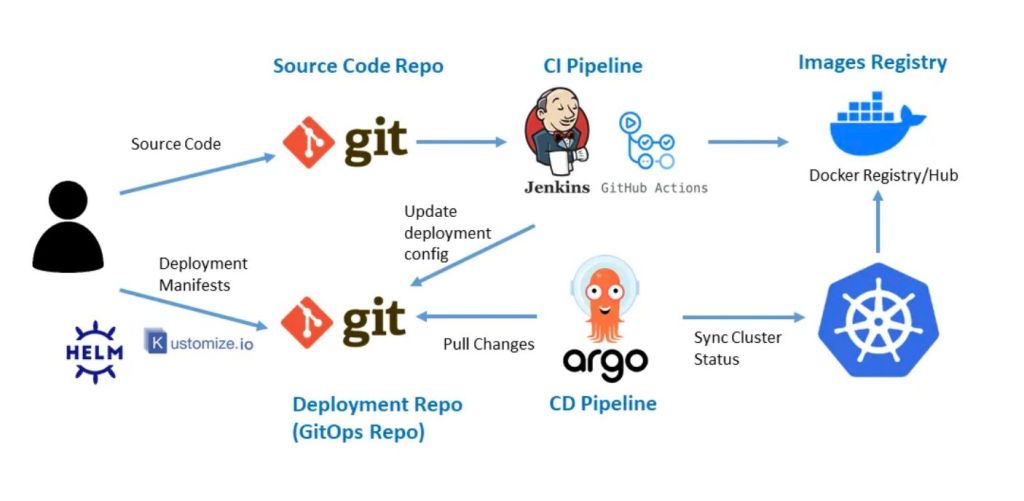
The answer is simple —
start learning, practicing, and applying tools in real-life scenarios to understand how modern systems operate efficiently.
Build a strong foundation with essential DevOps tools and concepts:Cloud Platforms: AWS, Azure, GCP
Operating Systems: Linux
Scripting: Bash
Version Control: Git, GitHub, GitLab
CI/CD: Jenkins, GitHub Actions, GitLab CI, ArgoCD
Configuration Management: Ansible
Containerization: Docker
Orchestration: Kubernetes, Helm, Kustomize
Monitoring & Logging: Prometheus, Grafana
Infrastructure as Code (IaC): Terraform
But remember — DevOps is not just about tools, it’s about how you use them:
1. Choose the right tools that are cost-effective, secure, and scalable
2. Design infrastructure that’s reliable, flexible, and easy to adapt
3. Automate deployments with minimal downtime and high availability
4. Implement monitoring, logging, and documentation to ensure stability and visibility
5. Gain hands-on experience through real-world projects
A true DevOps engineer doesn’t know every tool —they know how to use the right tools the right way.
Start small. Stay consistent. Build real things.
😃That’s how you become a DevOps Engineer. -
As a DevOps Engineer, security responsibilities are a critical part of your role, especially in modern cloud-native, containerized, and automated environments.

1. Infrastructure Security
Harden cloud infrastructure (AWS, Azure, GCP, etc.).
Use IAM roles/policies, least privilege access.
Manage security groups, NACLs, VPC subnets properly.
Encrypt data at rest and in transit.
2. CI/CD Pipeline Security
Secure GitHub Actions, Jenkins, GitLab pipelines:
Mask secrets (use secret managers like AWS Secrets Manager, HashiCorp Vault).
Restrict build permissions.
Validate source commits.
Scan code for vulnerabilities using tools like SonarQube, Snyk, or Trivy.
3. Container Security
Use minimal base images (e.g., Alpine).
Regularly scan Docker images for CVEs (e.g., Trivy, Grype).
Implement image signing and verification.
Use read-only file systems where possible.
4. Kubernetes Security
Implement RBAC (Role-Based Access Control).
Enable PodSecurityPolicies or PodSecurity Standards.
Use network policies to restrict traffic.
Protect etcd, API server with TLS.
Use Secrets and ConfigMaps securely.
5. Monitoring, Logging & Incident Response
Implement logging (e.g. loki, CloudWatch).
Set up alerting (e.g., Prometheus + Alertmanager, gchat notification, emails)
Use intrusion detection tools (e.g., Falco).
Conduct regular audit logs review.
6. Secrets Management
Do not hard-code secrets.
Use tools like:
AWS Secrets Manager
HashiCorp Vault
Kubernetes Secrets (with encryption at rest)
7. Compliance & Governance
Conduct regular security reviews.
Maintain documentation and audit trails.
8. Regular Testing
Perform vulnerability assessments and penetration testing.
Automate security tests in pipelines.
Best Practices
Implement Zero Trust architecture.
Enforce MFA for all admin accounts.
Keep systems and dependencies up to date. -
Cost Optimization – A DevOps Engineer’s Perspective
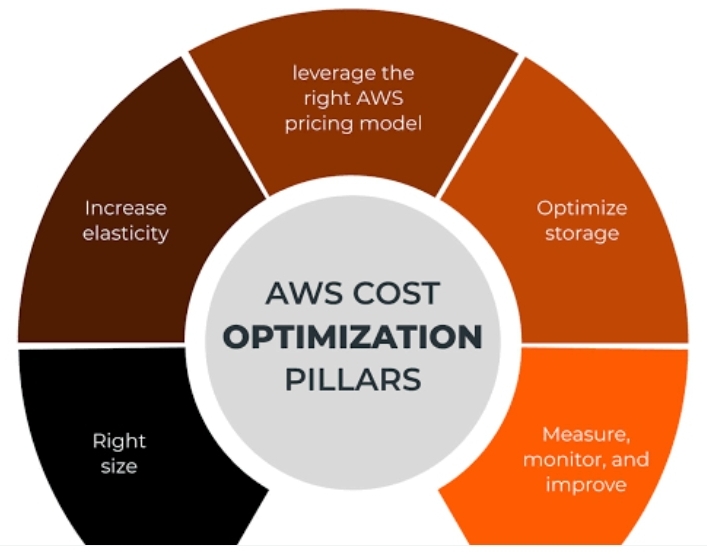
In today’s cloud-native world, cost optimization isn’t just a finance concern — it’s a DevOps responsibility. As engineers managing infrastructure, deployments, and automation, we’re in the best position to build systems that are not only scalable and reliable but also cost-efficient.
Here’s how I approach cost optimization as part of DevOps best practices:
1. Right-Sizing Resources
Avoid over-provisioning EC2 instances, EBS volumes, or Kubernetes nodes. Regular audits + performance monitoring = real savings.
2. Use Spot Instances & Auto Scaling
For non-critical workloads like batch jobs, CI/CD runners, or staging environments — spot instances can reduce costs by up to 90%. Combine them with Auto Scaling groups for flexibility.
3. Storage Clean-Up Automation
Automate the deletion of unused snapshots, orphaned volumes, old Docker images, and logs. Every unused GB adds up.
4. Leverage Serverless When It Makes Sense
For lightweight or event-driven workloads, using services like AWS Lambda or Fargate can eliminate the cost of idle resources.
5. Optimize Container Resource Limits
Set accurate requests and limits in Kubernetes to avoid CPU/memory wastage. Helps reduce cluster size — and the bill.
6. Set up a self-hosted Kubernetes cluster on AWS EC2 (or any VMs) using kubeadm, without relying on managed services like EKS or GKE.
7. Use Cost Explorer & Budgets
Track usage patterns using tools like AWS Cost Explorer or GCP Billing Reports. Set budgets and alerts to avoid surprises.
8. Shift-Left on Cost Awareness
Embed cost visibility into CI/CD pipelines. Let devs know the cost impact of their infra/config choices early in the cycle.
9. Automatically shutting down development or non-production servers at night and on weekends is one of the easiest and most effective ways to reduce cloud costs.
As DevOps engineers, cost-efficiency should be a design principle, not an afterthought. The goal is to build smarter, not just bigger. -
Why Docker is more important for a devops Engineer

As a DevOps engineer, Docker isn’t just a tool — it’s a game-changer.
Docker is an open-source platform that allows developers and DevOps teams to build, ship, and run applications in containers — lightweight, standalone packages that bundle everything an app needs: code, runtime, libraries, and dependencies.
How Docker Works:
Images – Blueprints built from Dockerfile
Containers – Running instances of images
Docker Engine –The core of Docker that runs on the host OS.
It includes:
Docker Daemon (dockerd) – Manages images, containers, networks, and volumes.
Docker CLI (docker) – Command-line interface to interact with the Docker daemon.
REST API – Enables communication between CLI and daemon.
Docker Hub/Registry – Stores and shares images (like AWS ECR or GitHub CR)
Dockerfile
A text file with step-by-step instructions to build a Docker image.
Example Dockerfile:
FROM node:18-alpine
COPY . /app
WORKDIR /app
RUN npm install
CMD [“node”, “index.js”]
Docker Compose
A tool to define and manage multi-container applications using a docker-compose.yml file.
1. Environment Consistency
Problem: “It works on my machine” issues between developers, testers, and production.
Docker’s Role: Packages everything (app, dependencies, OS libraries) into a container.
Same container runs anywhere — your laptop, test server, production cloud.
2. Faster and Predictable CI/CD Pipelines
Instant, isolated environments for building, testing, and deploying.
Build once, run anywhere: CI tools (like GitHub Actions, GitLab CI, Jenkins) build Docker images and deploy them without changes.
Speeds up testing and reduces deployment failures.
3. Simplified Deployment & Rollback
Deploy using Docker images = just pull and run.
Rollbacks are as easy as re-deploying a previous image.
Makes deployments repeatable, automated, and reliable.
4. Microservices Architecture Support
Modern applications use microservices (many small, independent services).
Docker lets you package and run each service in its own container.
Enables scalability, independent updates, and resource isolation.
5. Better Resource Utilization
Docker containers use fewer resources than traditional virtual machines.
You can run multiple containers on the same host with less overhead.
6. Easy Integration with Orchestration Tools
Docker works seamlessly with: Kubernetes, Docker Swarm, AWS ECS
Enables auto-scaling, self-healing, and zero-downtime deployments.
7. Security and Isolation
Containers isolate applications from each other.
You can apply security policies per container.
A DevOps engineer without Docker is like:
A carpenter without a toolbox
A pilot without a checklist
A chef without a kitchen
Are you using Docker in your pipelines? Or just getting started?
Let’s connect and share best practices!
Home


Hi, I’m Banesingh Pachlaniya
BE, M.Tech || DevOps Engineer || Cloud Architect
With over 9 years of experience, I specialize in architecting and managing scalable, secure, and highly available cloud infrastructure on AWS. I’m passionate about building automation-first systems using tools like Terraform, Ansible, Docker, and Kubernetes.
At DevOps Dose, I share hands-on insights, real-world project guides, and simplified tutorials to help you master DevOps the practical way — whether you’re just starting out or scaling up your skills.
Let’s connect
Join the fun!
Stay updated with our latest tutorials and ideas by joining our newsletter.
 DEVOPS DOSE