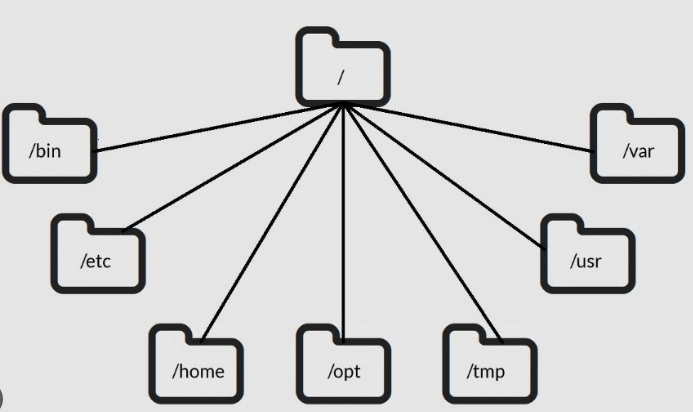
In Linux, everything starts from the root — /. The entire file system is organized in a tree-like hierarchy, and understanding this structure is essential for DevOps engineers managing servers, containers, and cloud systems.
| Directory | Purpose | DevOps Relevance |
|---|---|---|
/ | Root – The base of the file system | Starting point of all paths |
/bin | Essential binaries (e.g., ls, cp, mkdir) | Must-have tools for shell scripting and automation |
/etc | Configuration files for the system and services | Where you’ll edit config files like nginx.conf, sshd_config, crontab |
/home | User home directories (e.g., /home/banesingh) | Where DevOps users store scripts, SSH keys, etc. |
/opt | Optional or third-party software | Useful for custom tools or proprietary installations |
/tmp | Temporary files, often cleared on reboot | Used for temp script output or application cache |
/usr | Secondary hierarchy for user-installed apps and libraries | Houses tools like /usr/bin/docker, /usr/lib |
/var | Variable data, including logs (/var/log), caches, spools | Important for monitoring, debugging, and CI/CD logs |
Visual Tree (Simplified)
/
├── bin/
├── etc/
├── home/
│ └── banesingh/
├── opt/
├── tmp/
├── usr/
│ ├── bin/
│ └── lib/
├── var/
│ └── log/
Why It Matters in DevOps
- Automation: Knowing where config files and binaries live is key to scripting and Ansible roles.
- Troubleshooting: Logs in
/var/log, temp files in/tmp, and service configs in/etchelp debug systems fast. - Containers: Docker images and Kubernetes containers often use minimal Linux file systems — knowing the structure helps in custom Dockerfiles.

 DEVOPS DOSE
Leave a comment